Producing a robotic behaviour that matches real-life situations
1. Coordinating your team with an asset sheet
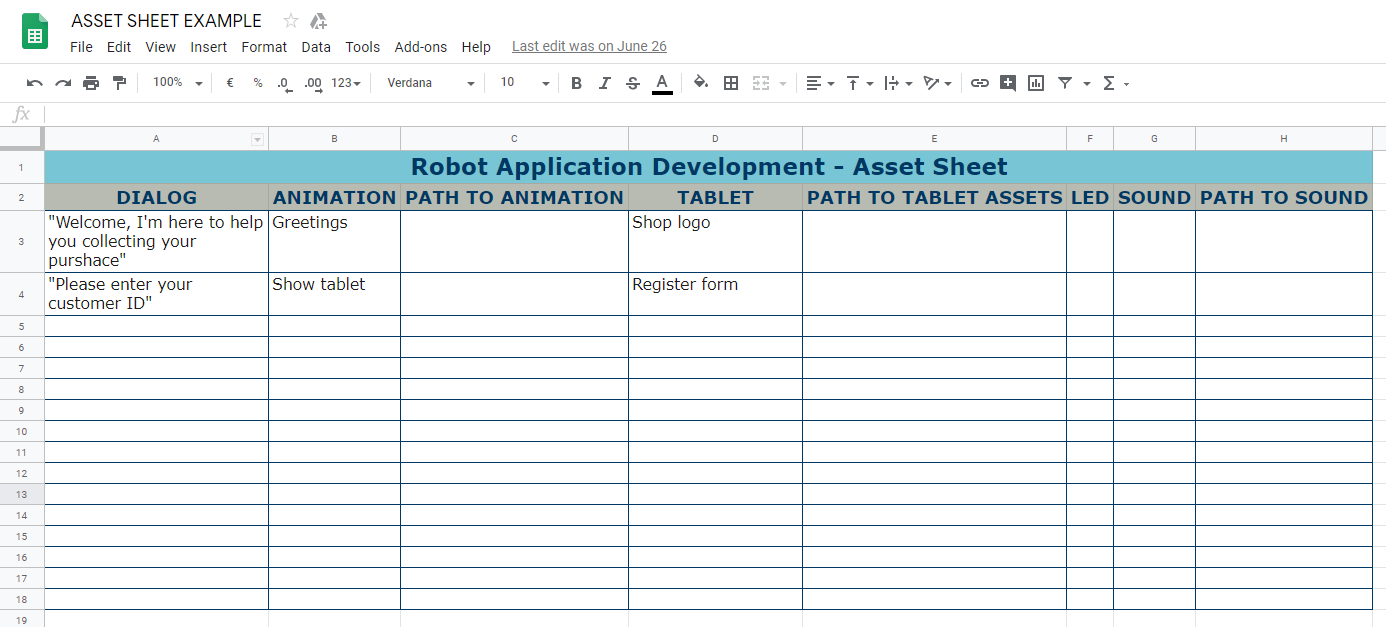
It can be hard to coordinate developers and content teams. We recommend using an asset sheet, so that you can find all the information you need in the same place: if anything changes on the content side, it’s easy to integrate the changes into the application. The asset sheet is more than just a list of assets: it also shows the intention behind the animations, sound design or tablet display, so that everyone in the team knows what it should look like.
2. Testing your code
a. Simplifying your testing
In order to make it easily testable, you should split your code with all the non-robotic calls on one side and all the robotic actions in a separate class.
Use debug commands to be able to jump directly to the various parts you will need to test: this will save you a lot of time and spare you and your team members from having to re-run the whole application every time you need to tweak a specific point!
Use logs and watch them constantly to understand what happens on the robot. You should log every call to a function, every event that you are connected to, and the values returned by the calls.
b. Practicing technical rehearsals in situation
A technical rehearsal consists of fully testing all of the features used in the robot behavior (tablet fallbacks, dialogs, animations, navigation, sound design, etc.) as if it was a real performance (i.e. an event in which robotic performers present a play to an audience in a specific setting). The technical rehearsal helps diagnose and prevent mistakes from occurring during the actual interaction. It also gives the developers and animators the opportunity to see how their designs will impact each other and to make final changes.
There was a project where we realized on the opening day that the aluminium poles used around the robot reflected sunlight directly into his lasers, causing him to see obstacles everywhere. There was nothing to do in the application itself, as it was the information relayed by the robot’s sensors that was wrong: the only way to solve this was to remove the poles.
Keep in mind that the robot will not evolve in a static environment: real-life conditions are ever-changing, and the robot has to be able to respond well no matter what. Test your application in various situations: make people come and leave suddenly, put up pictures of human faces next to coat hangers and check if they’re detected as humans, etc. Also, test your application with different lighting conditions, at different times of the day: if you’ve only tested on Thursdays at 6pm, you won’t be prepared for what happens in the morning when the sun is shining straight at your robot, or on Sundays where the shop is closed and the light is off.