Part 2: Adding movement
By default, Pepper will do simple animations while speaking (“body language”), but it can be worth replacing those with a more relevant, specific animation - which is what we'll do in this second part.
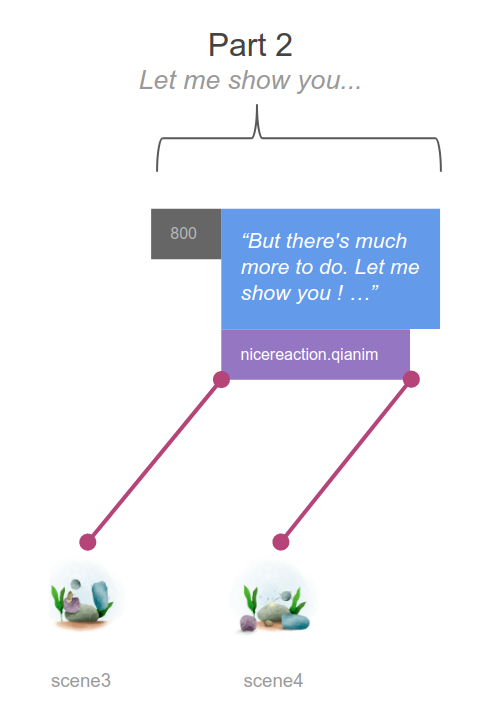
1. Adding animations
Import an animation file, using File > New > Import animation; in the “Default” tab in Emotion > Positive, pick nicereaction_a002. It will be added in the project’s “raw” folder.
Again, in order to keep the presentation readable, create a helper function:
private fun makeAnimate(animResource: Int) : Animate {
   val animation = AnimationBuilder.with(qiContext)
           .withResources(animResource)
           .build()

   return AnimateBuilder.with(qiContext)
           .withAnimation(animation)
           .build()
}
Let’s use this to make Pepper animate and speak:
////////////////////////
// Presentation logic //
////////////////////////

private fun runPresentation() {
   // Part 1: "Making me talk..."

   // ...

   // Part 2: "Let me show you..."

   Thread.sleep(800)
   setImage(R.drawable.scene3)
   makeSay("But there's much more to do. Let me show you ! ...").run()
   makeAnimate(R.raw.nicereaction_a002).run()
}
… however, this makes Pepper first speak, then do the animation, which isn’t what we want - we want Pepper to do both simultaneously.
2. Running actions simultaneously
So far, you have only synchronous calls: all actions are being executed one after the other.
Instead of calling action.run() (a blocking call that returns once the action is finished), you can call action.async().run() and immediately get a future object that represents the execution state of that action.
You can then wait for several futures with Future.waitAll - in your case, you want to wait for the say and animate future to both finish, as in the following.
////////////////////////
// Presentation logic //
////////////////////////

private fun runPresentation() {

   // ...

   // Part 2: "Let me show you..."

   Thread.sleep(800)
   setImage(R.drawable.scene3)
   val sayMore = makeSay("But there's much more to do. Let me show you ! ...")
   val animateEnthusiast = makeAnimate(R.raw.nicereaction_a002)
   Future.waitAll(sayMore.async().run(),
           animateEnthusiast.async().run()).value
}
3. Adding a callback after an animation
We also want to show an image after the animation is done, but while Pepper may still be speaking. You can do that by adding a callback after the animate future, in this case, “thenConsume”:
   val animateEnthusiast = makeAnimate(R.raw.nicereaction_a002)
   val animFuture = animateEnthusiast.async().run()
   animFuture.thenConsume {
       setImage(R.drawable.scene4)
   }
Your full presentation should now look like this:
////////////////////////
// Presentation logic //
////////////////////////

private fun runPresentation() {

   // Part 1: "Making me talk..."

   setImage(R.drawable.scene1)
   makeSay("Okay, so ... making me talk is a first step a bit like ...").run()
   Thread.sleep(200)
   makeSay("a rolling rock ...").run()
   setImage(R.drawable.scene2)

   // Part 2: "Let me show you..."

   Thread.sleep(800)
   setImage(R.drawable.scene3)
   val sayMore = makeSay("But there's much more to do. Let me show you ! ...")
   val animateEnthusiast = makeAnimate(R.raw.nicereaction_a002)
   val animFuture = animateEnthusiast.async().run()
   animFuture.thenConsume {
       setImage(R.drawable.scene4)
   }
   Future.waitAll(sayMore.async().run(),
           animFuture).value

   // Part 3: "I can make sound"


   // to do next

}